
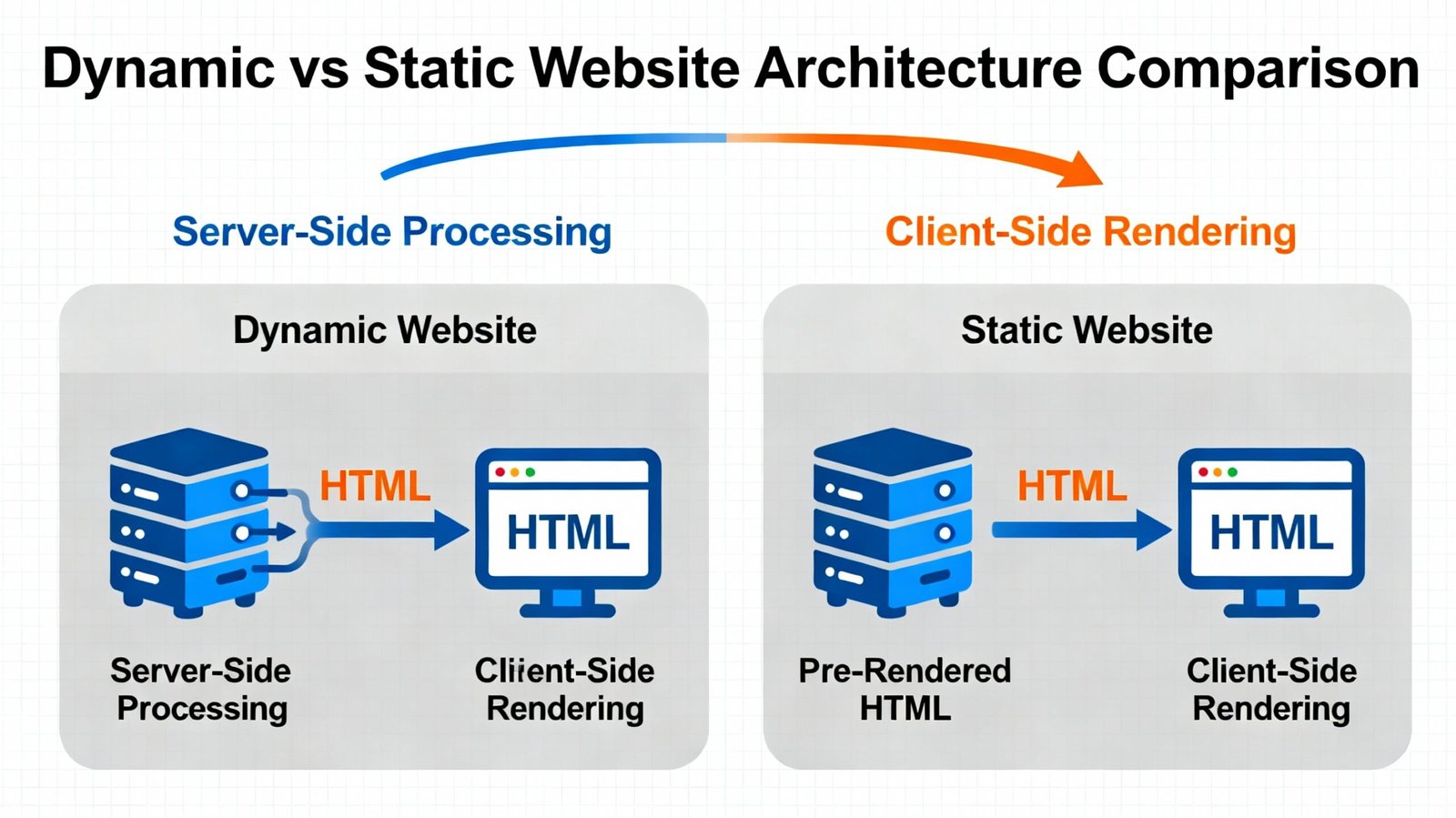
Updated September 2026. The difference between a static and dynamic website is not simply that one “moves” and the other does not. The real difference is how pages are generated, where content comes from, how often information changes, and what the website needs to do for users.
A static website can be the right solution for a fast, focused marketing site. A dynamic website is usually more appropriate when content changes frequently, users log in, products are managed through a database, or the site needs interactive business workflows.
This guide explains dynamic vs static websites in practical terms, with examples, advantages, limitations, SEO considerations and a decision framework for businesses.
Static vs Dynamic Website: Quick Comparison
| Area | Static website | Dynamic website |
|---|---|---|
| How pages are produced | Pre-built files are served to the browser | Pages or components can be generated from databases, APIs, CMS data or application logic |
| Content updates | Usually require editing source/content files or rebuilding the site | Often updated through a CMS, dashboard or database |
| User-specific content | Limited unless external services or client-side logic are added | Common for accounts, dashboards, carts and personalized experiences |
| Hosting complexity | Can be very simple | Depends on application stack, database and server requirements |
| Performance potential | Often excellent because files can be cached and served directly | Can also be fast, but requires good architecture, caching and database/API performance |
| Typical use cases | Landing pages, documentation, small brochure sites, campaign pages | CMS sites, ecommerce, portals, marketplaces, web applications |
What Is a Static Website?
A static website serves pre-generated HTML, CSS, JavaScript and media files. When a visitor opens a page, the server can deliver the existing file rather than building the page from a database request for every visit.
“Static” does not mean visually boring. A static site can include animation, interactive JavaScript, forms, video, filters and other browser-side interactions. The term mainly describes how the page content is produced and delivered.
Static website examples
- A one-page product launch site.
- A portfolio with a small number of projects.
- Documentation generated from files.
- A campaign landing page.
- A small brochure website that changes only occasionally.
- A site generated from Markdown or a static-site generator and deployed to a CDN.
What Is a Dynamic Website?
A dynamic website can assemble content from a content management system, database, API or application logic. The same template can display different information depending on the URL, user, database record, session or other conditions.
Examples include a WordPress service website where editors publish new pages, an ecommerce store that pulls product and inventory data, or a customer portal that displays account-specific information.
Dynamic website examples
- WordPress websites managed through a CMS.
- WooCommerce and Shopify stores.
- News and publishing sites.
- Job portals and directories.
- Customer dashboards.
- Booking systems.
- Membership platforms.
- Custom web applications.
Difference Between Static and Dynamic Websites
1. Content source
Static pages are usually stored as ready-to-serve files. Dynamic pages can pull data from a CMS, database or API and combine that data with templates.
2. Editing workflow
A static site may be edited through code, files or a build system. A dynamic site often provides an administrative interface where non-developers can update content.
3. Personalization
Static sites normally show the same core page content to everyone. Dynamic applications can display information based on login state, location, cart contents, user permissions or database records.
4. Complexity
A basic static site can have a very small technical footprint. Dynamic systems introduce additional layers such as a CMS, database, authentication, server-side logic or APIs.
5. Maintenance
Static sites can require less server-side maintenance because there may be no database or CMS to update. Dynamic platforms require ongoing attention to software updates, security, backups, compatibility and data integrity.
6. Scalability
Both models can scale. Static assets can be distributed efficiently through CDNs. Dynamic applications can also serve very large audiences when databases, caching and infrastructure are designed correctly. “Dynamic” does not automatically mean slow, and “static” does not automatically mean scalable without limits.
Static Website Advantages
- Simple delivery: fewer moving parts can make deployment straightforward.
- Strong performance potential: pre-built files are easy to cache and distribute.
- Reduced server-side attack surface: a site without a database or CMS login has fewer server-side components to protect.
- Lower infrastructure requirements: many static sites can run on inexpensive hosting or CDN-based platforms.
- Good fit for stable content: ideal when pages change infrequently.
Static Website Limitations
- Frequent manual content changes can become inefficient without a CMS or build workflow.
- Large sites may be difficult to manage if every page is maintained independently.
- User accounts, dashboards and database-driven features require additional systems.
- Business teams may depend on developers for routine updates if no editing interface is provided.
- Complex forms or workflows usually rely on external services or custom backend functionality.
Dynamic Website Advantages
- Content management: editors can often update pages without touching code.
- Reusable templates: hundreds or thousands of pages can use shared layouts.
- Database-driven content: products, jobs, properties, articles and profiles can be managed centrally.
- User functionality: accounts, carts, dashboards and permissions are practical.
- Integrations: CRM, ERP, booking, payment and API workflows can be connected.
- Automation: content or functionality can react to data and user actions.
Dynamic Website Limitations
- More software components create more maintenance responsibility.
- Poor database queries, plugins or integrations can hurt performance.
- Security needs to cover accounts, data, software updates and application logic.
- Hosting and development can be more complex than a small static deployment.
- Backups and recovery become more important because content may live in databases as well as files.
Is WordPress Static or Dynamic?
WordPress is primarily a dynamic content management system. Content is stored in a database and rendered through themes/templates. Editors can create or update pages through the dashboard without manually editing every HTML file.
However, a WordPress website can still use aggressive page caching or even static-export workflows. This is why modern architecture is not always a strict either/or choice.
If WordPress fits your project, see WordPress development services.
Are Shopify and WooCommerce Dynamic Websites?
Yes. Ecommerce stores rely on dynamic product, inventory, cart, account, order and payment data.
Shopify is a managed commerce platform. WooCommerce operates inside WordPress and typically runs on hosting selected by the site owner or developer. Both generate storefront experiences from structured product and commerce data rather than manually maintained static product pages.
For ecommerce options, see ecommerce website development services.
Static vs Dynamic Website for SEO
Neither architecture receives an automatic SEO advantage merely because it is static or dynamic.
Search engines need useful, accessible pages with clear URLs, crawlable content, internal links, appropriate metadata and technically sound delivery. Both static and dynamic sites can satisfy those requirements.
Static SEO strengths
- Fast page delivery can be easier to achieve.
- Simple HTML can reduce rendering complexity.
- Technical structure can remain predictable.
Dynamic SEO strengths
- Large content libraries can be managed efficiently.
- Templates can enforce consistent metadata and internal-link structures.
- CMS workflows make publishing and updating content easier.
Dynamic sites can create SEO problems when they generate duplicate URLs, thin filtered pages, crawl traps or inconsistent canonical tags. Static sites can create SEO problems when content becomes outdated or site architecture is difficult to maintain. The implementation matters more than the label.
For deeper technical work, see technical SEO services.
Static vs Dynamic Website Performance
Static pages have an architectural advantage when the task is simply delivering fixed content: there is less work to perform before sending the page.
Dynamic websites can still be very fast when they use:
- Full-page caching.
- Object/database caching.
- CDNs.
- Efficient queries.
- Optimized themes/components.
- Compressed responsive images.
- Controlled third-party scripts.
- Appropriate server resources.
If an existing site is slow, architecture is only one possible cause. Use a website audit or website speed optimization before assuming the whole platform needs to be replaced.
Static vs Dynamic Website Security
Static sites generally expose fewer server-side components because there may be no database, CMS dashboard or application login. That can simplify security.
Dynamic sites need stronger operational discipline, including:
- Software and dependency updates.
- Secure authentication.
- Role and permission management.
- Database protection.
- Backups and tested recovery.
- Input validation and application security.
- Monitoring for vulnerable extensions or plugins.
Security depends on implementation and maintenance. A neglected dynamic site can be risky; a properly maintained system can operate reliably for years.
When Should a Business Choose a Static Website?
A static approach is often sensible when:
- The website has a small number of pages.
- Content changes infrequently.
- There are no user accounts or complex database features.
- Performance and simple deployment are major priorities.
- The business has a developer-managed workflow for updates.
- The site is primarily a campaign, documentation or presentation layer.
When Should a Business Choose a Dynamic Website?
A dynamic architecture is usually more appropriate when:
- Non-technical staff need to edit content frequently.
- Products, jobs, listings or articles are managed at scale.
- Visitors log in.
- The website needs ecommerce.
- Content comes from databases or APIs.
- Forms trigger workflows or CRM actions.
- Different users need different information.
- The site is really a web application rather than a brochure.
Hybrid Websites: The Modern Middle Ground
Many modern sites combine static and dynamic techniques. A site may pre-generate marketing pages for speed while still using APIs for search, forms, inventory or logged-in features. Frameworks can also pre-render pages and update them when content changes.
This hybrid approach is useful because businesses do not need to choose one architecture for every feature. The right design can separate stable content from dynamic functionality.
Static vs Dynamic Website Cost
A basic static website can be inexpensive when the scope is small. Dynamic projects become more expensive as CMS configuration, database work, integrations, authentication or custom workflows increase.
But total cost should include maintenance. A static site that requires a developer for every text change may become inefficient for a marketing team. A CMS has more maintenance overhead but can reduce routine editing cost.
For current India planning ranges, see website development cost in India.
Static vs Dynamic Website Examples by Business Type
| Business requirement | Likely fit | Why |
|---|---|---|
| One-off ad landing page | Static or lightweight CMS | Small content scope and focused conversion path |
| Consulting website with regular articles | Dynamic CMS | Editors need ongoing publishing |
| Restaurant menu with occasional changes | Either | Depends on who maintains content and required integrations |
| Ecommerce store | Dynamic | Products, cart, orders and payments require structured data |
| Company documentation | Static-generated or hybrid | Content can be generated efficiently from files |
| Customer portal | Dynamic web application | Authentication, permissions and user-specific data |
| Property/job directory | Dynamic | Listings, filters and frequent updates |
Questions to Ask Before Choosing
- How often will content change?
- Who needs to edit the website?
- Will users log in?
- Does the site need a database?
- Will there be products, listings or other repeated content?
- Which integrations are required?
- How important is page speed?
- Who will maintain security and backups?
- How much will the site grow over the next two years?
- Is this primarily a website, or is it becoming an application?
Frequently Asked Questions
What is the main difference between static and dynamic websites?
A static site generally serves pre-built page files. A dynamic site can generate or assemble pages from a CMS, database, API or application logic.
Is a static website faster than a dynamic website?
Static delivery can be faster by default because less server-side work is required. A well-cached and optimized dynamic site can also be very fast.
Is a static website more secure?
It often has fewer server-side components and therefore a smaller attack surface, but security still depends on hosting, deployment, scripts and operational practices.
Can a static website have forms?
Yes. Forms can submit to an external service, serverless function or custom API. The site can remain mostly static while using dynamic services for selected features.
Can a dynamic website be converted to static?
Sometimes. Content-focused sites can be pre-generated or exported, but features such as carts, logins, dashboards and real-time database queries still require dynamic services.
Which is better for a business website?
It depends on editing needs and functionality. A small stable site may benefit from static delivery. A business publishing content frequently or needing ecommerce, accounts or integrations will usually benefit from a dynamic CMS or application.
What type of website is WordPress?
WordPress is normally dynamic because it stores content in a database and renders pages through themes/templates, although caching and static-generation techniques can change how pages are delivered.
Choose the Architecture Around the Workflow
The static-vs-dynamic decision should follow the business workflow rather than a technology trend. A small marketing site does not need application-level complexity. A growing ecommerce or portal project should not be forced into a collection of manually edited files.
If you are unsure which architecture fits your project, review website development services or web application development services, then share your requirements with Vylino for a scope-based recommendation.